

If you searched for “GoreBox APK,” you want to know where to get the game, whether it runs on your phone, and what it actually is before you spend storage on it. This guide covers all three. GoreBox is a violent physics sandbox from F²Games, and it is a mature, popular game on Android with a long update history. Here is where to download it, what to expect once you’re in, and how to fix the problems players run into most.
What GoreBox Actually Is
GoreBox is a sandbox where the point is experimenting. There is no story to follow and no ranking ladder to climb. You get a toolbox, a set of physics-driven characters, and a lot of room to try things.
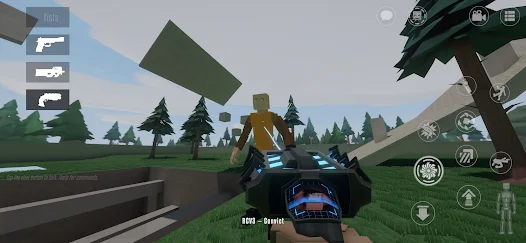
The game is the third and final entry in a line that started as a mobile project. GoreBox Classic and GoreBox Remastered came first, and the current version, known as GoreBox: Animosity (formerly the Definitive Edition), combines what those games offered into one release. It launched on Steam in 2022 and reached Google Play the same year.
What You Can Do in the Game
The Reality Crusher. This is the main tool. Players use it to spawn objects, move them around, and destroy things. It is the thing that makes GoreBox feel like a toy box and not a conventional shooter.
Physics-driven characters. Characters are ragdolls with simulated bodies, so hits, explosions, and falls produce different results depending on force and direction. The game leans heavily on gore, which is why it carries a mature rating.
Weapons and explosives. There is a large arsenal to test, from simple melee options to firearms and explosives, plus vehicles and other objects to play with.
A built-in map editor. You can build your own environments instead of only playing premade ones.
Community maps and mods through the Workshop. Players share maps and mods that extend the game, and you can browse them from inside GoreBox.
Gameplay modifiers. Reports describe settings such as invincibility, noclip, Creator Mode, and Divine Mode for unrestricted play. Exact options can change between versions.
Multiplayer. You can play with friends, including co-op, which is where a sandbox like this tends to get the most replay value.
Download GoreBox APK
GoreBox is available on Google Play under the package name com.F2Games.GBDE, and you can also get the APK directly from Modpole. Both give you the same game, so pick the route that suits you:
- Google Play is the right choice if you want automatic updates handled for you.
- The direct APK from Modpiole is handy if you want a standalone file you can keep, move between devices, or reinstall later without downloading everything again, or if your Play Store is missing or acting up.
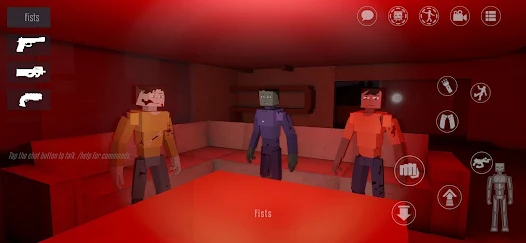
You can also play on a computer through Google Play Games on PC (Beta) or BlueStacks, and the PC version is on Steam, listed around $7.99 depending on region. Older builds such as GoreBox Remastered are archived on the F²Games itch.io page.
How to Install the APK From Modpiole
- Tap the download button on this page and check that the version, file size, and package name (com.F2Games.GBDE) match the details in the table above.
- Wait for the file to finish downloading.
- Open the file. When Android asks, allow installs from your browser or file manager for this one install.
- Tap Install, then open the game.
- Turn the “install unknown apps” permission back off once you’re done.
Good Habits for Any APK Install
- Compare the version with the Google Play listing so you know whether you’re current.
- Scan the file with a reputable mobile security app if you want extra peace of mind.
- Check the permissions. A game like this shouldn’t need your contacts, SMS, or call logs.
- Remember that APK installs don’t update themselves. Come back to this page or check Google Play when a new version is out.
- Keep it away from children. The game has mature content, so use your phone’s parental controls.
System Requirements and Performance
Android version: Android 7.1 (Nougat) or higher is listed as the minimum.
Storage: The file is relatively small compared to other 3D games, but leave extra free space so updates and saved maps don’t fail partway through.
Memory and processor: Physics simulation is demanding. Phones with more RAM and a newer chipset handle crowded scenes, explosions, and many objects far better than older devices.
Heat: Long sessions can warm up the phone and trigger slowdowns, especially with lots of objects on screen.
If the game’s graphics settings allow it, these changes help weaker phones most:
- Lower the resolution or render scale
- Turn shadows down or off
- Reduce effects and particle counts
- Cap the frame rate instead of leaving it uncapped
- Avoid spawning huge numbers of objects at once
Close background apps before launching, and keep your phone out of direct sunlight while playing.
A Beginner’s First 30 Minutes
GoreBox gives you freedom, which can be confusing at first. This order works well.
- Open the sandbox menu and look through the categories of items before spawning anything.
- Spawn a single object and move it around with the Reality Crusher to learn the controls.
- Try one weapon at a time. Switching constantly teaches you nothing.
- Test explosions in an open area so you can see how the physics react without a cluttered scene.
- Open the map editor and build a tiny arena to get a feel for the tools.
- Browse the Workshop for a map or two, and test how they perform on your phone before loading bigger ones.
- Try multiplayer with a friend once you’re comfortable with the basics.
Community Maps and Mods: Using Them Safely
Maps and mods from the in-game Workshop are part of what keeps GoreBox interesting. A few habits will save you trouble:
- Download content through the game, not through random APK sites claiming to bundle “mods.”
- Start with highly used items. Popular maps tend to be tested by more players.
- Watch performance. Big maps with many objects can overwhelm weaker phones, so test before committing.
- Remove content that causes crashes, and report broken items if the game offers a way to do so.
GoreBox vs GoreBox 27 vs Older Versions
| Version | What it is |
|---|---|
| GoreBox Classic | The earliest mobile version, which laid the groundwork for the series |
| GoreBox Remastered | A later build with improved ragdoll physics and an in-game Plus section for custom content |
| GoreBox (Animosity / Definitive Edition) | The current main game, combining everything from earlier versions |
| GoreBox 27 | A newer, separate game in early access with less content for now |
If you want the most complete and established experience, the main GoreBox game is the better starting point. GoreBox 27 is worth a look if you’re curious about where the series is heading, but it’s still being built.
Age Rating, Parents, and Availability
GoreBox is not suitable for children. The PC version carries an M rating from the ESRB for Blood and Gore and Violence. If you’re a parent or guardian, Google Play’s parental controls let you restrict app downloads by content rating, which is the simplest way to keep it off a child’s device.
Availability also varies by country. In June 2026, the Philippines’ Cybercrime Investigation and Coordinating Center announced that GoreBox had been taken down from Google Play and Steam in that country. If the game doesn’t appear in your Play Store, your region may be affected.
Common Problems and Fixes
The game won’t open after a manual install. Make sure the version is current and your Android system and Google Play services are updated. Some players report a message asking them to install from Google Play. If that happens, install the Play Store version instead.
It crashes after an update. Wait for the developer to release a patch, clear the game’s cache in Android settings, and if that fails, reinstall the official version.
The game lags or stutters. Lower resolution and effects, close background apps, free up storage, and spawn fewer objects at once.
The phone gets hot. Reduce graphics settings, remove the case, and take breaks.
Maps or mods won’t load. Check your connection, free up storage, and try a different map to see whether the problem is the item or your phone.
The game isn’t available in my Play Store. It may be restricted in your region or incompatible with your device. Check your Android version and the Play Store listing.
I lost my custom maps after reinstalling. Maps stored only on the device can be lost when you uninstall. Back up anything you care about if the game gives you an export option.
Frequently Asked Questions
Is GoreBox free on Android?
It’s listed as free with ads and optional in-app purchases. Check the Google Play listing for current pricing.
What is the package name for GoreBox?
The Android package is com.F2Games.GBDE.
What Android version do I need?
Android 7.1 or higher.
Where can I download the GoreBox APK?
GoreBox is available on Google Play, and you can also download the APK directly from Modpiole using the steps above.
Do I need Google Play to play GoreBox?
No. You can install the APK directly, though some players report the game asking them to install from Google Play. If that happens, the Play Store version will work.
Can I play GoreBox on PC?
Yes. It’s on Steam, and the Android version can run through Google Play Games on PC (Beta) or an emulator such as BlueStacks.
Does GoreBox have mods?
Yes. Community maps and mods are shared through the in-game Workshop.
Can I play with friends?
Yes. Multiplayer, including co-op, is supported.
Is GoreBox suitable for kids?
No. It contains graphic violence and gore. Use Google Play’s content rating controls to restrict it.
What’s the difference between GoreBox and GoreBox 27?
GoreBox is the established main game. GoreBox 27 is a newer, separate title that’s still in early access.
Final Verdict
GoreBox is a well-established physics sandbox for players who enjoy experimenting with ragdolls, weapons, and custom maps, and it runs on a wide range of Android phones. It’s available on Google Play, and you can get the APK directly from Modpiole if you’d rather have a standalone file. Whichever route you choose, check the version and permissions, keep the game away from children, and start with the sandbox basics. Test community maps carefully and adjust graphics settings to your phone, and you’ll get far more out of the game than any download page promises.